

You are using an out of date browser. It may not display this or other websites correctly.
You should upgrade or use an alternative browser.
You should upgrade or use an alternative browser.
TeensyMowerWebControl for esp32
- Thread starter Fürst Ruprecht
- Start date

Bernard redid/changed the PFOD Files 4 days ago, are the changes in your PFOD files?
Are you still working together on this?
Can you check if Setting/Bumper works for you?
In my case, YES numbers are counted up directly after Bumper Use.
And nothing is displayed for Bumper counter and Bumper value.
The console page also remains empty for me, no output.
But I also use Bernard's PFOD files, not the ones from your download.
Are you still working together on this?
Can you check if Setting/Bumper works for you?
In my case, YES numbers are counted up directly after Bumper Use.
And nothing is displayed for Bumper counter and Bumper value.
The console page also remains empty for me, no output.
But I also use Bernard's PFOD files, not the ones from your download.
Last edited:
I have make a brake in the webserver test because:
I spend lot of time time on it to understand and add OTA/RFID/MQTT support but nothing was reuse in the last version of @Fürst Ruprecht
If i understand correctly i see that all change present in Pfod need a rebuild of the html code !!!
Finally everything is not tested for me in the actual teensy code part (Multiple area mode, , GPS mapping , narrow passage with 2 coil , fast random mode using near wire localisation etc...)
But i don't forget it and when everything is ready and mqtt and rfid support is in the ESP32 code part i start again to work on it.
I am sorry if everything take time but only a long test run can validate each modification in the code.
I spend lot of time time on it to understand and add OTA/RFID/MQTT support but nothing was reuse in the last version of @Fürst Ruprecht
If i understand correctly i see that all change present in Pfod need a rebuild of the html code !!!
Finally everything is not tested for me in the actual teensy code part (Multiple area mode, , GPS mapping , narrow passage with 2 coil , fast random mode using near wire localisation etc...)
But i don't forget it and when everything is ready and mqtt and rfid support is in the ESP32 code part i start again to work on it.
I am sorry if everything take time but only a long test run can validate each modification in the code.
Fürst Ruprecht
Well-known member
Bernards pfod-code hat einen Fehler bezüglich console. Daher funktioniert sie nicht. Ich habe ihn darüber informiert. Außerdem setzt er mehr auf die Aufzeichnung auf sd-karte und das Auslesen über esp.Bernard redid/changed the PFOD Files 4 days ago, are the changes in your PFOD files?
Are you still working together on this?
Can you check if Setting/Bumper works for you?
In my case, YES numbers are counted up directly after Bumper Use.
And nothing is displayed for Bumper counter and Bumper value.
The console page also remains empty for me, no output.
But I also use Bernard's PFOD files, not the ones from your download.
Das ist aus meiner Sicht nicht stimmig. Der Teensy ist schnell genug für eine direkte Ausgabe der Concole auf dem Webserver, der DUE hat keine SD. Ich habe mir seine Arbeit angesehen, ich muß dafür aber auch erst einmal neue html-Seiten schreiben.
Seinen Kommentar kann ich nicht ganz nachvollziehen. RFID habe ich in neue Menüs übersetzt. MQTT nicht, da es aus meiner Sicht keinen Sinn macht, vom Browser aus MQTT Befehle zu versenden. Ich weiß auch nicht, wo die Synchronisation von MQTT und WebBefehlen stattfindet.
OTA: ist mir im Moment kein Handlungsbedarf bewußt.
Es sind nebenbei ja auch die anderen code-Änderungen einzupflegen. Für mich ist es ärgerlich, wenn ich mit meinen Möglichkeiten den pfod-code und die html-files an Bernards code anpasse und anschließend die pfod in github dennoch einen anderen Stand hat der dann mit dem webserver nicht zusammen paßt.
Ein weiteres Problem ist die Vermischung von pfod-app und web-browser Nutzung. Die funktionieren unterschiedlich. Der webserver ist als alternative Lösung zur pfod-app angedacht gewesen, nicht als Ausbau der pfod-Funktionalität. Eigentlich ein Wunder, daß trotzdem so viel funktioniert hat.
Where did you see that the console don't work ?????Bernards pfod-code hat einen Fehler bezüglich console. Daher funktioniert sie nicht. Ich habe ihn darüber informiert. Außerdem setzt er mehr auf die Aufzeichnung auf sd-karte und das Auslesen über esp.
It's OK into PFOD and arduremote in real time mowing, and you can use the SDcard log to see the console of 1 minutes before start Pfod or 2 days or 2 month and no limit duration (Only after 2000 log file on SDCard a message is present on power up).
MQTT protocol is used for Home assistant / google home etc ...., not for web server.
Fürst Ruprecht
Well-known member
Beitrag im Thema 'Ardumower Webinterface'
https://forum.ardumower.de/threads/ardumower-webinterface.23825/post-53863
Beitrag im Thema 'Ardumower Webinterface'
https://forum.ardumower.de/threads/ardumower-webinterface.23825/post-53863
The pfod.cpp supplies both the pfod-app and the web server with data. One user uses the pfod app, the next uses the web server via browser and the third uses both solutions, sometimes one, sometimes the other. Some users expect all extensions to work for both solutions. We also have the DUE and the Teensy, which have different performance levels. This leads to misunderstandings and errors in the code.
https://forum.ardumower.de/threads/ardumower-webinterface.23825/post-53863
Beitrag im Thema 'Ardumower Webinterface'
https://forum.ardumower.de/threads/ardumower-webinterface.23825/post-53863
The pfod.cpp supplies both the pfod-app and the web server with data. One user uses the pfod app, the next uses the web server via browser and the third uses both solutions, sometimes one, sometimes the other. Some users expect all extensions to work for both solutions. We also have the DUE and the Teensy, which have different performance levels. This leads to misunderstandings and errors in the code.
Yes but Console and (list log file for teensy) use pfodapp raw data format ,and the webserver don't manage this feature, it's the reason why you don't see console in webserver and it's OK in Arduremote and Pfod side.The pfod.cpp supplies both the pfod-app and the web server with data
If you really want to use Pfod compatible data you need to include this feature in the webserver side.
All data that are not include inside bracket {} are raw data and it's use for RFID / MQTT /and console.
Fürst Ruprecht
Well-known member
Vorab-Version:
Die pfod.h und pfod.cpp sind noch nicht überarbeitet bzw. geprüft.
Dazu kommt noch ein Update.
MultiWifi im webserver sollte aber grundsätzlich funktionieren, genauso die bisherigen html-Dateien (also nahezu fast alles).
Dies ist nur für den frühen Vogel !
Gruß Fürst Ruprecht
Die pfod.h und pfod.cpp sind noch nicht überarbeitet bzw. geprüft.
Dazu kommt noch ein Update.
MultiWifi im webserver sollte aber grundsätzlich funktionieren, genauso die bisherigen html-Dateien (also nahezu fast alles).
Dies ist nur für den frühen Vogel !
Gruß Fürst Ruprecht
Attachments
Fürst Ruprecht
Well-known member
Version 30.07.2022
Please note "Modification for manual menu.txt" if you want to use manual menu.
The "Yes/No" and "On/Off" buttons change colour. Unfortunately, this only works if the page is already loaded.
I have reworked the size of the tiles, the automatic adjustment to the screen should now work even better. I have also revised the LiveData menus.
Gruß Fürst Ruprecht
Please note "Modification for manual menu.txt" if you want to use manual menu.
The "Yes/No" and "On/Off" buttons change colour. Unfortunately, this only works if the page is already loaded.
I have reworked the size of the tiles, the automatic adjustment to the screen should now work even better. I have also revised the LiveData menus.
Gruß Fürst Ruprecht
Attachments

SefanH
Well-known member
Ich habe die Firmware auf meinen ESP gespielt. Die Baudrate ist bei meinem Mower auf 19200 eingestellt, also musste ich das nochmal kurz ändern. Die auskommentierten WLAN-Einstellungen in der TeensyMowerControl......ino habe ich teilweise in Betrieb genommen.
Jetzt fehlen mir noch ein paar Werte in der Weboberfläche, da wird noch nichts angezeigt, aber ich habe auch noch die Firmware mit den alten PFOD-Dateien auf dem Mower.
Tolle Arbeit!
Die Fehler beim Kompilieren der PFOD-Dateien werde ich mal in den betreffenden Dateien kommentieren und an den @Fürst Ruprecht senden.
C++:
IPAddress myIP(192, 168, 178, 90);
IPAddress network_gateway(192, 168, 178, 1);
IPAddress network_subnet(255, 255, 255, 0);
IPAddress network_dns(192, 168, 178, 1);
Jetzt fehlen mir noch ein paar Werte in der Weboberfläche, da wird noch nichts angezeigt, aber ich habe auch noch die Firmware mit den alten PFOD-Dateien auf dem Mower.
Tolle Arbeit!
Die Fehler beim Kompilieren der PFOD-Dateien werde ich mal in den betreffenden Dateien kommentieren und an den @Fürst Ruprecht senden.
Last edited:
SefanH
Well-known member
Ich habe jetzt die Änderungen kommentiert. html_line hat Probleme gemacht und musste auskommentiert werden. Warum, weiß ich nicht. Alle Änderungen sind mit "Sefan" markiert.
Die geänderte pfod.cpp musste ich in *.txt umbenennen um sie hier hochladen zu können. Die Datei habe ich im Anhang hinterlegt. Nun muss ich testen!
Die geänderte pfod.cpp musste ich in *.txt umbenennen um sie hier hochladen zu können. Die Datei habe ich im Anhang hinterlegt. Nun muss ich testen!
Attachments
Fürst Ruprecht
Well-known member
Hallo Stefan,
ich habe schon lange das Pfod-Thema nicht mehr in der Hand gehabt.
Sobald ich Zeit habe, schau ich mir Deine Hinweise an.
Spontan würde ich sagen, Du solltest die Baudrate möglichst hoch setzen (115200).
Wir haben in der Vergangenheit beobachtet, daß bei der Datenübertragung nur begrenzt viel übertragen werden kann, dann geht der Rest verlohren. Deshalb; gibt es HTML-Seiten, die in mehreren Schritten aktualisiert werden. Das aber nur so mal am Rande.
Gruß Fürst Ruprecht
ich habe schon lange das Pfod-Thema nicht mehr in der Hand gehabt.
Sobald ich Zeit habe, schau ich mir Deine Hinweise an.
Spontan würde ich sagen, Du solltest die Baudrate möglichst hoch setzen (115200).
Wir haben in der Vergangenheit beobachtet, daß bei der Datenübertragung nur begrenzt viel übertragen werden kann, dann geht der Rest verlohren. Deshalb; gibt es HTML-Seiten, die in mehreren Schritten aktualisiert werden. Das aber nur so mal am Rande.
Gruß Fürst Ruprecht
SefanH
Well-known member
Die Baudrate funktioniert sogar mit 230400. Werde ich jetzt mal testen.Hallo Stefan,
ich habe schon lange das Pfod-Thema nicht mehr in der Hand gehabt.
Sobald ich Zeit habe, schau ich mir Deine Hinweise an.
Spontan würde ich sagen, Du solltest die Baudrate möglichst hoch setzen (115200).
Wir haben in der Vergangenheit beobachtet, daß bei der Datenübertragung nur begrenzt viel übertragen werden kann, dann geht der Rest verlohren. Deshalb; gibt es HTML-Seiten, die in mehreren Schritten aktualisiert werden. Das aber nur so mal am Rande.
Gruß Fürst Ruprecht
Ich habe festgestellt das die Slider im byLane-Menü nicht die voreingestellten Werte zeigen. Scheinbar werden die neuen Einstellungen übertragen und lassen sich auch speichern, aber wenn man das Menü/die Seite aktualisiert, dann sind die Slider wieder ganz links oder ganz rechts...
Ein paar Probleme konnte ich bereits lösen, Reset nach beendetem Ladevorgang lies sich nicht umschalten - lag jedoch an der Teensymower-Firmware, da war was auskommentiert.
It's old .And i don't remember for ESP32.@Bernard Does MQTT work? I have Homeassistant and would like to use it. I didn't see where the address for the MQTT broker is defined and the port doesn't appear anywhere either?!? Did I miss something?
Something sure it's was working with PI and PiArdu.
You can test this firmware into ESP 32.
All config is in the config.h file under mqtt part.
AzuritBer/ESP32_RFID_mqtt at master · Boilevin/AzuritBer
Ardumower full odometry version. Contribute to Boilevin/AzuritBer development by creating an account on GitHub.
 github.com
AzuritBer/Home assistant at master · Boilevin/AzuritBer
Ardumower full odometry version. Contribute to Boilevin/AzuritBer development by creating an account on GitHub.
github.com
You need to see something like that if it's OK:
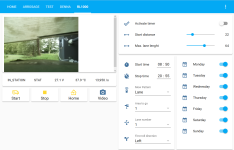
Do not forget to activate mqtt in tensy firmwareOk, if there is any time, i'll take a look!
Hello,
I try to use in my Indego-Teensy the WebServer on the ESP32.
I downloaded the last Version 30.07.2022 Link: https://www.diy-robot-lawn-mower.com/threads/teensymowerwebcontrol-for-esp32.38/post-1363
In the pfod.h and pfod.cpp I have adapted as follows:
But I get following 2 Errors by compiling:
What can be the problem? My mower has two perimeter coils, butI think the STANDARD option is ok for me?
I try to use in my Indego-Teensy the WebServer on the ESP32.
I downloaded the last Version 30.07.2022 Link: https://www.diy-robot-lawn-mower.com/threads/teensymowerwebcontrol-for-esp32.38/post-1363
In the pfod.h and pfod.cpp I have adapted as follows:
//#define DUE true //if you use DUE-CPU
#define TEENSYDUINO true //if you use Teensy4.1-CPU
#define STANDARD true //if you are NOT Fürst Ruprecht
//#define FUERSTRUPRECHT true //if you are Fürst Ruprecht
#define USECONSOLE true //if you want to send the arduino-console-Output to your mobile/tablet
//#define USEPFOD true //if you use the arduino-pfod-V3-app
#define TEENSYDUINO true
#define STANDARD true //choose normal code for one Perimetersensor
//#define FUERSTRUPRECHT true //choose for two Perimetersensor and Fürst Ruprecht Stepper application
But I get following 2 Errors by compiling:
pfod.cpp:2436: error: 'class Robot' has no member named 'perimeterNoiseLeft'; did you mean 'perimeterInsideLeft'?
2436 | serialPort->print(int(robot->perimeterNoiseLeft)); //FR:robot->perimeterNoise ??
| ^~~~~~~~~~~~~~~~~~
| perimeterInsideLeft
C:\arduino-1.8.19\portable\sketchbook\teensymower\pfod.cpp: In member function 'void RemoteControl::sendConsoleMenu(boolean)':
pfod.cpp:2646: error: 'class Robot' has no member named 'html_line'
2646 | serialPort->print(robot->html_line);
| ^~~~~~~~~
C:\arduino-1.8.19\portable\sketchbook\teensymower\robot.cpp: In member function 'virtual void Robot::loop()':
'class Robot' has no member named 'dropLeftCounter'; did you mean 'bumperLeftCounter'?
What can be the problem? My mower has two perimeter coils, butI think the STANDARD option is ok for me?
Fürst Ruprecht
Well-known member
Jozsi76,
kannst Du mir Dein Programm (alles) als zip-File einstellen, dann schau ich mir das mal an.
Gruß Fürst Ruprecht
kannst Du mir Dein Programm (alles) als zip-File einstellen, dann schau ich mir das mal an.
Gruß Fürst Ruprecht